What to look for in a Content Management System (CMS) platform?
When you break it down, every CMS choice essentially boils down to these 14 things:
- Business impacts: What impacts will this platform have on my business?
- Real costs: Do I understand the true costs of the platform?
- Ongoing requirements: Launching a website is only the start, what are the ongoing needs of the selected platform?
- Technology: How well does the CMS play with my existing technology stack?
- Skillset: How easy is the CMS to deploy? Does it require special skills to use?
- Security: Security is obviously a big consideration. You want a CMS that will keep your content and customer data secure against current and future threats.
- Blogging: The CMS software must not only manage the blog, but also make it easy for content providers to create, edit, post, and promote blog entries.
- Customization: The best CMS platforms are not always the ones that give clients everything they need right out of the box, but the ones that allow clients to customize the platform to meet their needs.
- Search engine optimization: SEO is an art that you’ll want to keep practising, and you’ll need your new CMS to aid you in that.
- Social media marketing: Does the CMS make it easy to share content to all the major social networks?
- Email marketing: Your chosen CMS should be the content hub for all your publishing and marketing requirements, including email marketing.
- WYSIWYG content creation: Can marketers easily edit the look and feel of content using the editor?
- Future needs: How does the platform cope with changes in my business needs?
- Support: Does the vendor provide the training and ongoing support I need to be successful?
Let’s look at each of these three things in more detail.
1. Business impacts
At the start of this post, the first item we considered was the organizational impact of technology.
When considering a CMS platform your choice will impact very differently.
When considering the impacts on your business you need to think about the responsibilities that you take on when selecting a platform.
With a development platform, you will either need internal staff or contract out external technical expertise. When you develop your website on these platforms, it requires considerably more steps in terms of functional requirements and development cycles to produce the final product.
With Solutions platforms, most of the development is done and your business will need to configure the platform to suit your needs. Adoption is also generally faster as these systems are designed to be easy to use, with extensive documentation and support.
2. Real costs
A recent post we took a detailed look into the true costs of managing a website. We looked at the costs across a number of lenses and provided a 20 point checklist to help you make sure the pricing was correct.
3. Ongoing requirements
The processing of building a website for your business can be challenging. Managing the stakeholder, ensuring you deliver on the requirements of the business, getting your vendor to deliver on their promises are only a few of the issues that arise during the process.
The build, however, should be considered the start of your digital journey. The hard work begins the day the site is launched and you now need to validate the assumptions you made many months prior during the discovery phase.
Integrated analytics provide the starting point for your answers, A/B testing of content and user journeys. This then leads to updates to the website, changes to content, launching landing pages for specific campaigns. Understanding how the CMS platform behaves when continuous change is required should form part of the decision-making process.
4. Technology integration
Your CMS can’t exist in a silo. At a time when technology affects every aspect of your business, it is crucial that your CMS work well with your other marketing, sales, communication, and project management initiatives.
Start by doing a technology audit. Make note of the tools/technologies you use to do the following:
- Marketing automation
- Customer relationship management
- Project management system
- Forms management
- Email/Social media marketing
- ERP
- Customer support
Most of these tools will either feed data into or pull data from your CMS.
For example, your blog post might have a gated content or lead magnet associated with it. This lead magnet plugs into your lead acquisition tool, which, in turn, plugs into your marketing automation and email marketing tools.
Once a lead is qualified, you would want to feed it to your CRM. This, in turn, should plug into your marketing automation tool to further nurture the lead(s).
This creates a number of dependencies which affect your CMS decision. The better integrated your CMS is with your other marketing and sales tools, the smoother your marketing machinery.
While you’re doing this, also take a close look at any other upgrades or migration planned in the near future. If you’re going to make significant changes to your technology stack in the next six months, it makes sense to choose a CMS that will be compatible with these changes.
5. Skillsets
This is an often overlooked part of the CMS selection process but it has a deep impact on the success of any CMS deployment.
Simply put, you want to choose a CMS that your team can actually use.
Broadly speaking, you can divide this into two categories: technical and end-user skill availability.
A. Technical skill resources
The first thing you should consider is your existing IT expertise.
Understand that installing, maintaining and securing a CMS is a challenge. If you don’t have in-house IT capabilities to do this, you can rule out on-premise/hosted solutions altogether.
Start by auditing your IT resources and document the following:
- Security expertise: Ask how competent is my IT team in securing the CMS against different, ongoing attacks?
- Existing infrastructure: Is my existing infrastructure secure and scalable enough to run the CMS? If not, is a SaaS solution a more viable option?
- Maintenance: Can your IT handle ongoing maintenance and upkeep work?
- Ease of development: Do you have in-house resources to modify the CMS if need be? If not, how easy is it to find freelancers to outsource development? Is the CMS written in a language with plenty of third-party development options (say, PHP vs. Perl)?
Keep in mind that technical skills are a concern only if you choose a hosted/on-premise solution.
If you go with a SaaS solution, you can skip these technical requirements altogether and focus on the end-user experience.
B. End-user skill
Besides the technical requirements, you’ll also want to consider how easy the CMS is to use for your end-users (marketers, content creators, and salespeople).
Ideally, you should choose a CMS that your end-users can use readily, without additional training.
Here are two things you should consider here:
- Authorship Experience (AX): Authorship experience determines how easy it is to create, edit and manage content. A poor AX will have an impact on the productivity, efficiency, and morale of your content creators.
- User-Experience (UX): This determines the actual experience of using the CMS. For a SaaS solution, this will include the process to onboard new users, integrate third-party tools, etc. For a hosted solution, this would include the installation, maintenance, and modification process as well
It’s also a good idea to do a skills audit for all stakeholders in the CMS decision-making process. Try to understand how comfortable they are with content management systems in particular and technology in general. For developers, audit for existing programming skills as well.
6. Security
Security is obviously a big consideration. You want a CMS that will keep your content and customer data secure against current and future threats.
There are four things to consider here:
- Security features: Does the CMS have built-in security features (such as 2-step authentication)? If not, does it have plugins and third-party integrations to improve security?
- The pace of development: Do the developers release updates and security fixes quickly? This is a particularly big issue with open-source software.
- Infrastructure requirements: Does the CMS support any infrastructure-level upgrades to improve security?
- Plugin/module environment: Are your commonly used plugins/modules secure? Do their developers regularly check for fixes?
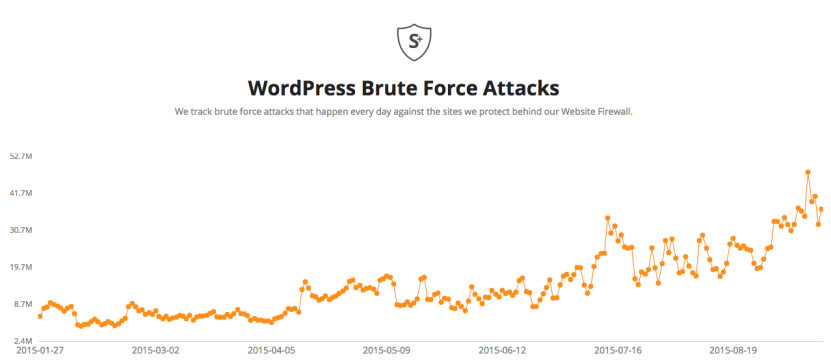
Considering that there are tens of millions of brute force attacks against a popular CMS like WordPress every day, it’s crucial that you invest in security.
7. Blogging
A major component of keeping customers up to date on company news involves blogging. The CMS software must not only manage the blog, but also make it easy for content providers to create, edit, post, and promote blog entries. These blog posts can also form a key facet of the company’s content marketing strategy, so a CMS platform that enables blog posting is ideal.
Consider the following:
- Can the CMS accommodate your content creation workflows?
- Is the content creation, editing, previewing, and publishing experience simple for non-technical users?
- Can the CMS automatically publish to RSS feeds?
- Is it easy for readers to share posts on social media?
8. Customization
The best CMS platforms are not always the ones that give clients everything they need right out of the box, but the ones that allow clients to customize the platform to meet their needs.
Some platforms restrict access to code and force you to use the platform exactly as it is. Usually, those same platforms provide front-end templates that may be pretty but are difficult to customize or re-build. You want to be in a position to tweak the UI and UX of the back-end content authoring experience for your in-house team, as well as the end user experience, giving you full control over the customer experience.
Ask the following:
- Can I customize the look and feel of my website freely, or are there restrictions?
- Can the backend be tailored to simplify the interface, hide functionality, or to match my brand?
- Will it be prohibitively expensive to add the features I need?
- Does the vendor offer a strong level of documentation?
- What are the additional costs for support and custom development from the vendor or their agency partners?
9. Search engine optimization
Simply put, if you implement a new CMS, but nobody can find your website or content in search engine results, that’s a bad investment.
SEO is an art that you’ll want to keep practising, and you’ll need your new CMS to aid you in that. You need to find a CMS with capabilities to optimize content for search engine crawlers.
The best CMS platforms will have features that help you configure title tags, meta tags, site maps, and search-friendly URLs to boost the content’s visibility on major search engines.
Ask yourself these questions:
- Does the CMS have basic SEO features such as SEO friendly URLs, sitemaps, and image alt-tagging?
- Are there SEO optimization features enabled by default?
- Have other clients had positive SEO results using the CMS?
10. Social media marketing
With so many users getting their information from social networks, a CMS that can deliver content to these networks is not a luxury, it’s a necessity. In fact, social networks are the biggest source of inspiration for consumer purchases with 37% of consumers finding purchase inspiration through platforms like Facebook, Twitter, and Instagram.
In the B2B space, 73% of B2B companies say their salespeople use LinkedIn to engage with clients and prospects, leading to roughly 80% of social media B2B leads coming from the platform. If these numbers don’t convince you to get serious about social media, nothing will.
Consider these points:
- Does the CMS make it easy to share content to all the major social networks?
- Does the CMS offer analytics to help track social traffic and shares?
11. Email marketing
Your chosen CMS should be the content hub for all your publishing and marketing requirements, including email marketing. With that in mind, the CMS you choose must work with automated email marketing tools to make sure that the correct content gets sent to the qualified segments of your audience.
Think about the following:
- Can I manage email marketing campaigns from within the CMS?
- Are there metrics tracking features for email marketing?
- Are there other useful features to nurture email leads?
- Does the platform integrate with email marketing technologies like MailChimp and Campaign Monitor?
12. WYSIWYG content creation
WYSIWYG (What You See Is What You Get) user interfaces have become a staple of CMS platforms, from the most primitive to the most advanced.
As the name suggests, a WYSIWYG content authoring environment allows marketers and non-technical users to use familiar formatting tools (like the ones you would find within Microsoft Word), to create content. Advanced editors may also support drag-and-drop, allowing content creators to move images and other page elements around.
Consider these questions:
- Can marketers easily edit the look and feel of content using the editor?
- Does the editor support multiple delivery channels, with content previews?
- Is the editor quick and responsive, or is it slow and difficult to use?
- Does the editor allow you to embed video to support your video content on product pages and other web pages?
Features for marketing & editorial
The CMS features listed above will make up the foundation needed to launch a successful website. But when it comes to features specifically for marketing and content creation, we have a lot more to discuss.
As mentioned before, it’s a good idea to prioritize these features into three categories; must-have, important, and nice-to-have. This will make your selection process much easier.
Some features you should consider are:
Must-have features
- Integrations with your marketing and sales stack: Just as the choice of CMS impacts numerous departments, that choice also affects the systems upon which those departments depend. The CMS must integrate with systems like customer relationship management (CRM) platforms, marketing campaign management systems, and enterprise resource planning (ERP) software to ensure smooth operations across departmental boundaries.
- Easy-to-use and feature-rich editors: WYSIWYG editing, content versioning, customization options, and a UI that content authors love to use.
- A mobile-friendly dashboard: Your team should be able to read, manage and even edit content on the go without any issues.
Important features
- User-management with permission control: Particularly important if you have a lot of content contributors.
- Supports a variety of content types: Including videos, audio (including podcasts), blog posts, and standalone pages.
- Personalization: The ability to create segments, serve them with personalized content, and build one-to-one experiences.
- Strong level of vendor support: The vendor should have a strong ethos around supporting their customers to learn the mechanics of the platform, overcome roadblocks, connect with partners, and grow their digital presence.
Nice-to-have features
- Workflows and content approval processes: To ensure efficient content creation and higher content velocity.
- Multi-site support: To manage all your brands and online properties in one place, even if they serve overseas markets.
- Multilingual support: For clients with a global reach, a CMS that supports multiple languages is a must. These capabilities must go beyond a simple machine translation and take into account dialects, idioms, and cultural references. Not only must a CMS adapt to users who read different languages, but it also must work for content creators who write in those languages.
- Documentation and training: Preferably in multiple formats (text, video, and audio).
Of course, these are only guidelines. Your business might classify these features into other categories depending on your requirements.
Features for developers
Your developers have distinctly different requirements from your marketing and editorial teams. For them, maintaining, modifying and keeping the CMS secure are top priorities.
On that note, here are some developer-focused features you should consider:
Must-have features
- Scalability: The CMS shouldn’t compromise on performance when traffic spikes occur, or new sites are launched. This is often achievable through a SaaS or PaaS infrastructure.
- Security features: Such as user management, permission control, regular bug fixes, 2-step authentication, etc.
- Stability: The CMS shouldn’t crash or hang.
Important features
- Performance: CDNs and reliable servers should be high on your priorities list.
- Upgradability: Without leading to compatibility and migration issues associated with Drupal.
- Modularity: Especially with open-source software.
- In-depth documentation: For a better developer experience
- Framework-agnostic: Or not relying on a specific tech stack
- Version control: So content authors can access previous versions of content, compare current the content to current versions, and track which team member made the changes and when those changes were made.
Nice-to-haves
- 24×7 support: When users encounter issues with their CMS platform, their internal resources may not have what they need to solve the problem. Open-source CMS platforms often have user forums, in which developers can answer questions and provide solutions. Proprietary platforms can also offer support by phone or email for a fee or a part of the purchase price.
- Resolves issues: Has a great track record when it comes to fixing bugs and issues.
13. Future needs
Your CMS platform is an investment and asset to your business. Many businesses depreciate the asset as they assume that there is a lifespan to the CMS platform. This isn’t necessarily the case, with the growth of SaaS platforms, re-platforming will become a thing of the past. Your website will “evolve” with the needs of your business. Retraining and retooling will become a thing of the past.
Ask vendors how the product is kept current and how new features find their way into your website. Understand how upgrades work and the costs involved with the upkeep and maintenance of the CMS platform. Propose a staged approach to the development of your website and ask when you change and want new features, applications, and how these are priced
14. Support
Support is one of those services that are either neglected or completely absent. With open source, support is an additional cost to the CMS platform. What adds complication is a traditional development platform is that you not only need support of the software but support of the hosting Infrastructure.
What can arise in this situation is the people supporting the software are not necessarily the same people, this leads to the blame game where each party points the finger at the other.
Having a single party responsible for the whole solution is imperative. With SaaS platforms, it is an end to end system so all aspects are supported.
In addition, training is a support item. Helping you achieve the most from your platform ensures that your satisfied and achieve the return on your investment. With SaaS platforms, they have “customer success teams” who are allocated to ensure that your solutions deliver on your expectations.