Course Content
M1: A $200 Billion Wake-Up Call
large parts of Texas, Florida and Georgia are still recovering from the effects of two hurricanes. Millions of people and businesses remain without electricity, phone service or even access to clean water. Some of these services will take months to restore.
0/5
M3: One Platform vs a Mix of Best-­in-Breed Technologies: What’s The Best For Your Business?
Many of the decisions being made about what to use are less about technology itself, but rather about the way that companies engage with that technology.
0/3
M5: Using WordPress as an Enterprise CMS: 9 Things You Should Know
WordPress is the most popular Content Management System (CMS) in the world, powering roughly 29 percent of all active websites. Yikes. With numbers like those, it’s no surprise that WordPress crosses the minds of those who are choosing a CMS.
0/8
M6: How to Choose a SaaS CMS: The 9-Point Checklist
Choosing a Content Management System (CMS) is a gigantic decision. The bigger your brand, the more people will rely on your CMS to provide great backend and frontend experiences.
0/6
M7: 6 Reasons To Ditch Drupal
If you’re still using Drupal 6 as your CMS, then your time is running out. Recently, the company officially announced that the platform was reaching its EOL or ‘End Of Life’, and that loyal users would be forced to upgrade to Drupal 7 or 8.
0/1
M8: How to Choose the Best CMS for Mobile Apps
With a multitude of potential CMS suitors on the market, how should you go about choosing the best one for mobile applications?
0/4
M9: The Web is Broken: And The CMSs Broke It
Having a CMS sounded so nice at first. It ensured that you wouldn’t be locked out of your own website, and you’ll be able to make changes whenever you need to. However, when all the developers started arguing about which language and framework should be used to build the website and system, you knew something might be wrong.
0/6
M10: Top 3 IoT Challenges: Data, Data and Data
CMSWire’s David Roe recently published an excellent piece on the problems with IoT devices. He mentioned security and user privacy, but I couldn’t help but expand on the problems relating to data. As far as I’m concerned, the top three issues with the IoT era are all data-based.
0/4
M11: Tools for choosing the right CMS
Making the right choice in CMS platform for your business is harder than you think. In fact, choosing a new content management platform for your web assets has never been so hard. The wrong decision in this case can have a lasting impact on your digital initiative for years and cost considerable cash and time to rectify.
0/10
M13: Multi-Site Management Strategies That Actually Work
Multi-site management promises a great deal, from new market penetration to scaling your business to a global audience. There a reason the world’s largest brands open new offices and physical stores when they enter new markets.
0/5
M14: GDPR/POPI Explained In 5 Minutes: Everything You Need to Know
GDPR stands for General Data Protection Regulation. It’s a game-changing data privacy law set out by the EU
0/6
M15: GDPR Preparation: 7 Questions To Ask Your CMS Vendor
With General Data Protection Regulation (GDPR) rolling out in just a few short months, you need to make sure every relevant aspect of your business is GDPR compliant.
0/4
M17: Hybrid CMS: A Headless platform, But With a Front-End
By 2020, experts forecast that the world will be host to over 20 billion IoT devices, from smart speakers to smart wearables and everything — and I really do mean everything — in between.
0/8
M18: Intranet CMS: A Guide to Choosing Intranet Software
Almost every company has an intranet — even the companies that claim otherwise. It may not be a unified system, but an internal, private network will certainly exist in some shape or form, usually patched together by the likes of Gmail, Google Drive, Slack, and Hubspot.
0/7
M19: Cloud CMS: 8-Point Checklist For Choosing a Cloud CMS (And Hidden Gotchas You Need To Know)
The past year changes in the IT sector have made the cloud become real. Cloud computing is becoming an essential tool for businesses of all sizes and budgets, but there are some basic requirements that should be considered before choosing a cloud CMS platform.
0/6
M20: Content Optimization: What It Is and How To Do It
Seeing that initial traffic spike post-content launch is awesome, but things start to get really depressing when it flattens out. Which is why content optimization is critical.
0/6
M21: Drupal as a CMS and Commerce Platform: The Ultimate Guide
The three main players in the traditional, monolithic CMS space are WordPress (which accounts for 27+ million live sites), Joomla (1.8 million), and Drupal (630,000.)
0/5
M22: What Is A Digital Experience Platform? DXP vs CMS Explained
The web content management space is no stranger to acronyms. In fact, whenever a new acronym emerges, there’s a temptation to label it as just another fading buzzword and ignore it completely.
0/5
M23: Custom CMS & Backend Frameworks Be Damned
We’ve gotten accustomed to the ease of use and functionality provided by the modern CMS. With so many CMS platforms on the market, it’s important to understand what CMS is right for your business. It’s also important not to neglect the organisational impact of a new CMS.
0/9
M24: Decoupled CMS Explained: Pros and Cons
In today’s multi-channel environment, where content is consumed across various digital touchpoints, the legacy or monolithic CMS is no longer the only option. Instead, we’ve seen terms like headless CMS, decoupled CMS, agile CMS, hybrid CMS and more thrown around as new CMS architectures continue to be designed, leaving companies spoilt for choice.
0/6
M26: You Just Became The Head of Marketing. What Now?
Congratulations. You’ve just landed the role you’ve been long searching for. You're now heading up a marketing team and have earned the title. You have seen first hand that being a senior marketer is no job for the faint-hearted.
0/11
M27: 5 Proven Tactics To Building & Growing an Email List From Scratch
Those early days when you know you’re doing everything right, but NO ONE is signing up to your email list. Okay, maybe a few people are signing up…like maybe five people a week. A blip on the radar for the kind of business you want to build. At that rate, it is going to take you around 4 years to get to 1,000 subscribers.
0/7
M28: eCommerce CMS: 32 Must-Have CMS Features (& Why Most Commerce Platforms Aren’t Good CMS)
When you start looking into eCommerce platforms to grow your online store, you'll be immediately greeted by countless platforms touting their accessibility and vying for your business.
0/3
M29: Do You Know The True Cost of Managing a Website?
You have heard the idiom about the tip of the iceberg. But have you given a second thought to what this actually means? Embarking on a website redevelopment is a pretty good example of the analogy. There’s a reason why a website redevelopment is in equal parts exciting and harrowing.
0/5
M30: 8 Types of eCommerce Customer Pain Points (And How to Relieve Them)
When we are in physical pain, we can visit a doctor. When we have perceived unmet needs, we usually end up buying products. Those unmet needs are our pain points. As an online store owner, you are your customers’ doctor. Your eCommerce store is the hospital. Your staff are the nurses and orderlies.
0/6
M31: Searchable Websites: Best Practices in Search to Drive Website Conversions
If you have ever typed in a search bar on a website for a product you are looking for, you are already familiar with site search. Site search is a feature on websites that enables users to search for specific content. It's quite a handy feature found in many different places, such as Amazon, Reddit, and many popular eCommerce websites.
0/10
M32: Business Must Evolve to Become More Resilient
Resilience – the ability to recover quickly from illness or misfortune – is a valuable attribute for both individuals and organizations.
0/4
M35: Going Global with a Headless CMS Multi-Language Site
In the world of digital marketing, there is no denying the importance of having a multilingual site. This is especially true for eCommerce businesses that want to expand their reach and visibility to new markets. Not only will a multilingual site help you with internationalization and expanding the audience you market to, but it will also help you earn new customers. A multilingual site delivers a far more personalized experience to the end visitor if it's presented in a language that is native to them.
0/6
eCommerce Content Management Specialist Course

Use cases for cloud-based CMS’

For many of the reasons we just discussed – and more – a cloud-based CMS can be the go-to solution for certain organizations.

[Use case #1] A quick start

Companies that want to “hit the ground running” should likely consider a cloud-based CMS over a traditional solution. Because the CMS software is installed on a third-party server that is already prepared to run said software, the company won’t need to spend time, money, and energy upgrading its in-house hardware – and also won’t need to install the CMS software on all of its computers and devices.

Similarly, startups and companies that are just beginning to gain traction can benefit from using a cloud-based CMS due to the relatively lower upfront cost of using this option. As opposed to traditional CMS platforms – which come with a hefty upfront investment – cloud-based CMS’ require smaller, on-going payments. As we mentioned earlier, while this cost can add up over time, it may be a better option for companies operating on a stringent budget while getting started.

[Use case #2] Easy collaboration

Cloud-based CMS’ also allow all stakeholders to collaborate and “do their thing” simultaneously (rather than sequentially). For example, those on your team responsible for content creation can add content while developers are setting up the database, application, etc. – rather than having to wait for this side of the project to be complete.

Along with this, because cloud CMS’ are API-based, the content is guaranteed to appear correctly, without any odd glitches getting in the way of deployment.

[Use case #3] Tightened security

As we mentioned earlier, cloud CMS’ have become more and more reliable in terms of security over the past few years. With the recent unrolling of the GDPR, organizations now have to be extra careful to ensure the safety and security of their customer-facing data – especially when being stored on third-party servers.

Once again, though, since this duty is taken on by the CMS provider…well, it’s one less thing for the organization to worry about.


Watch out for the hidden costs of a cloud CMS

Now, it’s worth noting that everything we’ve said about cloud-based CMS’ thus far assumes that the solution in question is actually “up to snuff.”

That is, not all cloud-based CMS’ are created equally.

If you’re currently looking for the best cloud-hosted CMS solution for your current situation, there are a number of things you need to consider.

[Hidden cost #1] What training is required?

When introducing any new process, tool, solution, etc., to your team, a learning curve of some kind is pretty much unavoidable.

However, as we’ve said, one of the main selling points of cloud-based CMS’ is that they’re supposed to be easy to integrate into your organization’s operations. That said, you’ll want to ensure that the one you choose actually follows through with this promise – and is easy to use for all stakeholders involved.

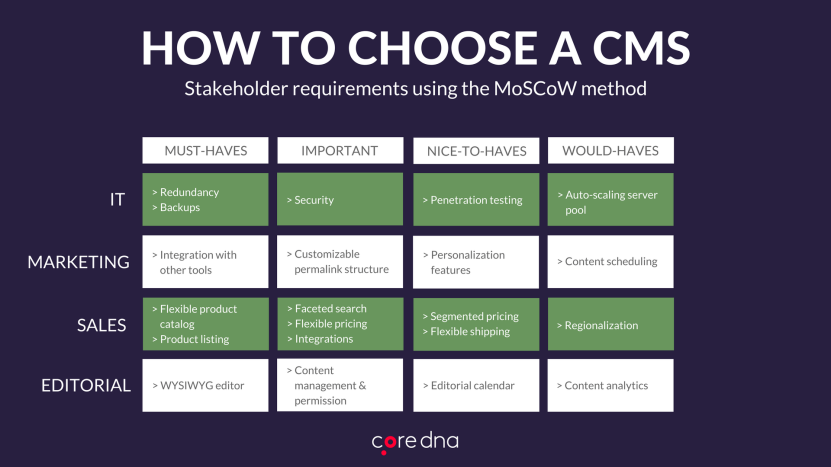
The following chart details the features and functions a variety of individuals on your team will likely expect from a cloud-based CMS:
How to choose a cloud CMS

Basically, you want to ensure the CMS you choose allows your IT, marketing, sales, and editorial teams to all be able to hit the ground running equally. Simply put: if any one of these teams faces a hangup, it will ultimately defeat the purpose of using a collaborative, cloud-based solution in the first place.

[Hidden cost #2] What’s the true cost of licensing?

We discussed this a bit earlier in this article, but it’s worth revisiting.

Since using a cloud-based CMS inherently means you’re “renting” server space from a third-party company on a month-by-month basis, this also means you’ll face an ongoing fee to ensure your content – and your site, overall – remains active.

Again, this monthly cost will likely be much more affordable for smaller companies – at least initially. However, as time goes on, this ongoing cost will eventually outweigh that of a traditional CMS that only required a single, lump-sum payment.

Additionally, most cloud-based CMS’ typically provide tiered pricing options – meaning that companies looking to scale will also be looking at an increased monthly investment in their cloud-based solution.

[Hidden cost #3] How much will you need to invest?

One of the most detrimental things you can do when adopting a CMS (of any kind) is to “set it and forget it” – that is, to have your development and design teams set up the initial build of your site, then never once decide to look back.

Yes, using a cloud-based CMS means your web host will typically take the reins in ensuring your site runs smoothly – but that in no way means you should take a hands-off approach to website administration. As we’ve discussed previously, there are a number of ongoing costs inherent to managing a website, including:

  • Design and content updates and upgrades
  • Monitoring and testing website performance
  • Replatforming

All these things (and more) will require ongoing investments in terms of money, time, and manpower. If you’re not prepared to make these investments, this will certainly be quite detrimental to your business.

[Hidden cost #4] Are updates included in the monthly cost?

With on-premise CMS platforms, the organization in question “owns” the CMS – and everything along with it, including the server space housing it. That said, companies that use on-premise CMS solutions can make updates to their CMS and website as they see fit.

Those who utilize a cloud-based solution, however, may be required to pay extra to their web host in order to implement certain changes or updates.

Regardless, after a specific update has been implemented, the organization’s development team will also need to work to ensure that nothing from the previous version “clashes” with the updated version.

[Hidden cost #5] What’s included in the monthly fee?

Along with what we just mentioned, organizations that go with a cloud-based CMS will want to know for certain what they’ll be getting in exchange for their monthly fee.

As alluded to earlier, many cloud-hosted CMS providers have tiered pricing options that cater to organizations with varying needs and capacities. For example, some providers offer versions of service that:

  • Limit the number of updates you can make per month (as mentioned)
  • Limit the number of pageviews allowed per month
  • Do or do not offer SSL certification

While some of these aspects may require you to do a bit of projecting, it’s important that you have a decent idea of what you’ll need on a month-by-month basis in order to figure out which tier is right for your organization moving forward.

[Hidden cost #6] Migration and replatforming

Replatforming may be necessary over the course of your website’s lifespan – and it’s a rather resource-consuming venture, to be sure.

That said, you’ll want to know whether the customized aspects of your site (e.g., plugins, integrations, etc.) will migrate seamlessly or not – as this may add an entirely new cost to the price of replatforming.