Use cases for cloud-based CMS’
For many of the reasons we just discussed – and more – a cloud-based CMS can be the go-to solution for certain organizations.
[Use case #1] A quick start
Companies that want to “hit the ground running” should likely consider a cloud-based CMS over a traditional solution. Because the CMS software is installed on a third-party server that is already prepared to run said software, the company won’t need to spend time, money, and energy upgrading its in-house hardware – and also won’t need to install the CMS software on all of its computers and devices.
Similarly, startups and companies that are just beginning to gain traction can benefit from using a cloud-based CMS due to the relatively lower upfront cost of using this option. As opposed to traditional CMS platforms – which come with a hefty upfront investment – cloud-based CMS’ require smaller, on-going payments. As we mentioned earlier, while this cost can add up over time, it may be a better option for companies operating on a stringent budget while getting started.
[Use case #2] Easy collaboration
Cloud-based CMS’ also allow all stakeholders to collaborate and “do their thing” simultaneously (rather than sequentially). For example, those on your team responsible for content creation can add content while developers are setting up the database, application, etc. – rather than having to wait for this side of the project to be complete.
Along with this, because cloud CMS’ are API-based, the content is guaranteed to appear correctly, without any odd glitches getting in the way of deployment.
[Use case #3] Tightened security
As we mentioned earlier, cloud CMS’ have become more and more reliable in terms of security over the past few years. With the recent unrolling of the GDPR, organizations now have to be extra careful to ensure the safety and security of their customer-facing data – especially when being stored on third-party servers.
Once again, though, since this duty is taken on by the CMS provider…well, it’s one less thing for the organization to worry about.
Watch out for the hidden costs of a cloud CMS
Now, it’s worth noting that everything we’ve said about cloud-based CMS’ thus far assumes that the solution in question is actually “up to snuff.”
That is, not all cloud-based CMS’ are created equally.
If you’re currently looking for the best cloud-hosted CMS solution for your current situation, there are a number of things you need to consider.
[Hidden cost #1] What training is required?
When introducing any new process, tool, solution, etc., to your team, a learning curve of some kind is pretty much unavoidable.
However, as we’ve said, one of the main selling points of cloud-based CMS’ is that they’re supposed to be easy to integrate into your organization’s operations. That said, you’ll want to ensure that the one you choose actually follows through with this promise – and is easy to use for all stakeholders involved.
The following chart details the features and functions a variety of individuals on your team will likely expect from a cloud-based CMS:
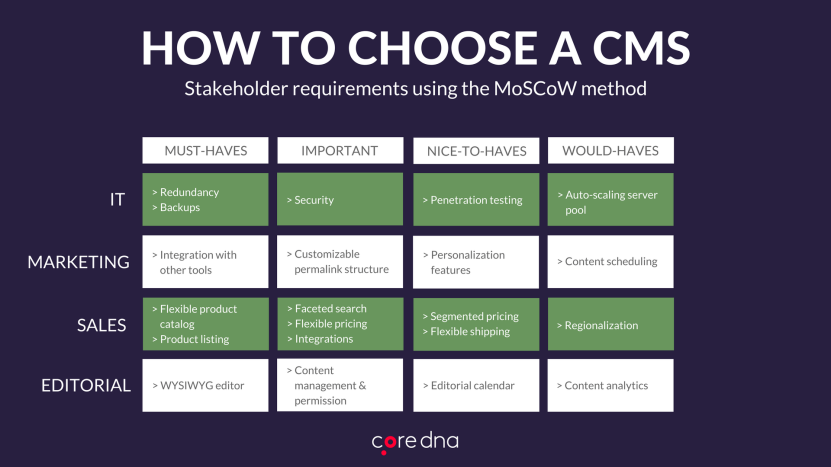
Basically, you want to ensure the CMS you choose allows your IT, marketing, sales, and editorial teams to all be able to hit the ground running equally. Simply put: if any one of these teams faces a hangup, it will ultimately defeat the purpose of using a collaborative, cloud-based solution in the first place.
[Hidden cost #2] What’s the true cost of licensing?
We discussed this a bit earlier in this article, but it’s worth revisiting.
Since using a cloud-based CMS inherently means you’re “renting” server space from a third-party company on a month-by-month basis, this also means you’ll face an ongoing fee to ensure your content – and your site, overall – remains active.
Again, this monthly cost will likely be much more affordable for smaller companies – at least initially. However, as time goes on, this ongoing cost will eventually outweigh that of a traditional CMS that only required a single, lump-sum payment.
Additionally, most cloud-based CMS’ typically provide tiered pricing options – meaning that companies looking to scale will also be looking at an increased monthly investment in their cloud-based solution.
[Hidden cost #3] How much will you need to invest?
One of the most detrimental things you can do when adopting a CMS (of any kind) is to “set it and forget it” – that is, to have your development and design teams set up the initial build of your site, then never once decide to look back.
Yes, using a cloud-based CMS means your web host will typically take the reins in ensuring your site runs smoothly – but that in no way means you should take a hands-off approach to website administration. As we’ve discussed previously, there are a number of ongoing costs inherent to managing a website, including:
- Design and content updates and upgrades
- Monitoring and testing website performance
- Replatforming
All these things (and more) will require ongoing investments in terms of money, time, and manpower. If you’re not prepared to make these investments, this will certainly be quite detrimental to your business.
[Hidden cost #4] Are updates included in the monthly cost?
With on-premise CMS platforms, the organization in question “owns” the CMS – and everything along with it, including the server space housing it. That said, companies that use on-premise CMS solutions can make updates to their CMS and website as they see fit.
Those who utilize a cloud-based solution, however, may be required to pay extra to their web host in order to implement certain changes or updates.
Regardless, after a specific update has been implemented, the organization’s development team will also need to work to ensure that nothing from the previous version “clashes” with the updated version.
[Hidden cost #5] What’s included in the monthly fee?
Along with what we just mentioned, organizations that go with a cloud-based CMS will want to know for certain what they’ll be getting in exchange for their monthly fee.
As alluded to earlier, many cloud-hosted CMS providers have tiered pricing options that cater to organizations with varying needs and capacities. For example, some providers offer versions of service that:
- Limit the number of updates you can make per month (as mentioned)
- Limit the number of pageviews allowed per month
- Do or do not offer SSL certification
While some of these aspects may require you to do a bit of projecting, it’s important that you have a decent idea of what you’ll need on a month-by-month basis in order to figure out which tier is right for your organization moving forward.
[Hidden cost #6] Migration and replatforming
Replatforming may be necessary over the course of your website’s lifespan – and it’s a rather resource-consuming venture, to be sure.
That said, you’ll want to know whether the customized aspects of your site (e.g., plugins, integrations, etc.) will migrate seamlessly or not – as this may add an entirely new cost to the price of replatforming.