1. Become a prolific patcher
The best and easiest way to maintain website security is to stay alert to all the new patches that are released for your CMS, applying them as soon as they’re made available, which makes all the hard work put in by white-hat hackers worthwhile.
Take a look at your CMS now – if you’re not using the latest security patch version, then there will already be exploits out there waiting to cause you harm. If you’re technically-minded, you can look up your CMS’s version in one of the vulnerability databases to see precisely what you’re up against.
2. Check for server vulnerabilities
Your CMS platform is the most likely source of your website’s vulnerabilities, but it’s by no means the only one. The web server running your site also needs to be patched and maintained. Unlike updating your CMS, however, this can be a rather involved procedure, requiring downtime if you only have one server running your site.
3. Choose a completely managed platform
There is, of course, a comprehensively secure solution to this problem, and that’s to choose a completely managed platform.
4. Hide behind a Web Access Firewall (WAF)
The Core dna platform is secured by a Web Access Firewall, or WAF for short. A WAF inspects all of the traffic heading towards a site, filtering out any malicious activity or attempted attacks before they ever arrive.
These firewalls are fantastic for security and pretty affordable if you shop around. Still, you need to have your WAF solution implemented by a professional, because incorrect implementations are easily bypassed.
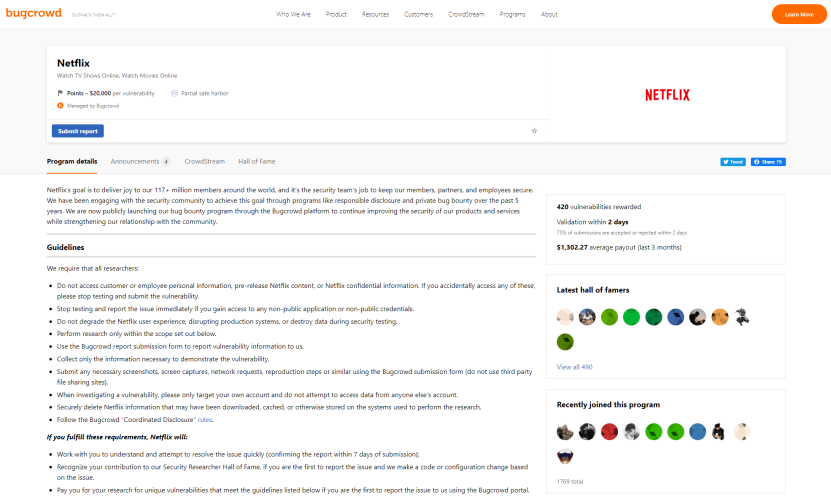
5. Invite an attack (have a bug bounty program)
The ultimate test of a website’s security is to have somebody attack it. We’re talking about the practice of “penetration testing,” and there are many security businesses that provide this service (yet another example of hackers using their skills for good instead of evil.)
The only problem is that the cost of having a trained pro go over your website with a fine-toothed comb is prohibitively expensive for many companies.
Fortunately, Core dna has its very own hacking expert who performs penetration testing regularly. We also have the platform tested by independent third parties frequently, to make sure we can stand up against our peers.
6. Automate the attack
While there’s no substitute for a real-life hacker testing your website’s security, there are automated tools, widely available online, that can do the job for you, albeit to a lesser degree.
A word of warning though, these tools should only ever be used by a professional or on a testing environment, because if the tool ends up being successful in exploiting your site, you’ll suffer an outage as a result!
Sidenote: There are a number of automated test suites for penetration testing, a quick Google search reveals a vast sea of options.
These all work on a fairly consistent principle whereby they are configured with a wide suite of exploit strategies that they execute one and a time until they have run through their entire stable. In this way, they essentially test via brute force and exploring all options in an automated fashion.
A couple of tools that you might want to use: Acunetix (paid) and OpenVas (free)
7. SSL certificate for ALL websites (even internal ones)
Make sure you have your site set up with an SSL certificate, and it’s running over HTTPS.
An SSL certificate ensures that your website is encrypted as it travels over the internet so that if it’s intercepted along the way, user details, passwords, and even credit card details will be distorted and indecipherable to hackers. All websites on the Core dna platform are set up with an SSL certificate.
Not only will an SSL make your site more secure, but you’ll also be missing out on traffic if you haven’t got one installed: Chrome (and most other web browsers) will warn visitors to your site, and Google may penalize your search ranking if you don’t have one.
8. Spread out your infrastructure and filter out malicious requests before they hit your server
A Denial of Service (DoS) attack is an attempt to render your website unavailable by flooding it with more requests than your server can handle. While a DoS attack emanates from a single source, a Distributed Denial of Service (DDoS) attack comes from multiple sources simultaneously and is therefore much harder to contend with.
DDoS attacks are frequent, and you have to take steps to mitigate them. You won’t have any of your precious data stolen, but your website will go down.
Some sites have known DOS vulnerabilities (listed online) that render them utterly defenceless to hackers. With such vulnerabilities, a straightforward DoS attack can topple even the most hardened hosting infrastructure, and the only solution is to update your patches immediately.
The best CDN providers offer their clients a degree of protection against DoS and DDoS attacks by having gigantic infrastructures capable of withstanding enormous volumes of traffic.
9. Logging and log analysis
Websites with poor security get hacked all the time (sad, but true), and the first thing to get stolen is their user databases.
These databases contain all the usernames and matched passwords of a site’s account holders, and because people use the same logins wherever they go on the web (despite plenty of advice to the contrary), hackers can use the stolen logins to break into other sites.
Taking the safety measures listed in this article will prevent hackers from capturing your database and encrypt passwords in the unlikely event that they are stolen. But, logging and log analysis are also crucial elements in the security process.
Through careful monitoring, you can identify any user from a single IP address who attempts multiple logins with different usernames and passwords, shutting down their activity before it’s too late.
The more you log, the better you’ll understand the behavior patterns of customers (and staff!) and the quicker you can respond to anything suspicious.
10. Regularly scan your server
A piece of malicious code uploaded to your site can have disastrous consequences. Of course, you want to try and stop this happening by strictly controlling what can be submitted to any area of your website, but hackers will always find a way.
For example, a malicious user can leave a harmful piece of code in a comment on your blog, which can then cause significant damage to a subsequent user who views it. When the comment loads, that harmful code can trigger anything from a pop-up window opening to a malicious redirect, a stolen session or password, and even the complete compromising of a computer.
It’s, therefore, good practice to regularly scan your server for trojans, malware, and other malicious files using a tool like Lynis, which is, essentially, anti-virus software for your server. It will find and remove any problematic code before it can cause any significant problems.